You are looking at two numbers and wondering which one is right for your desk. This common dilemma is more significant than it appears. The choice between a 27 inch and a 32 inch monitor is not about a mere five diagonal inches. It is a decision that changes how you see your work, play, and everything on screen. The real answer lies in a system of three locked factors: your viewing distance, your target resolution, and your primary use case. This guide will move beyond personal preference to give you a logical framework for a choice you will live with every day.
27 inch vs 32 inch Monitor: The Physical Reality
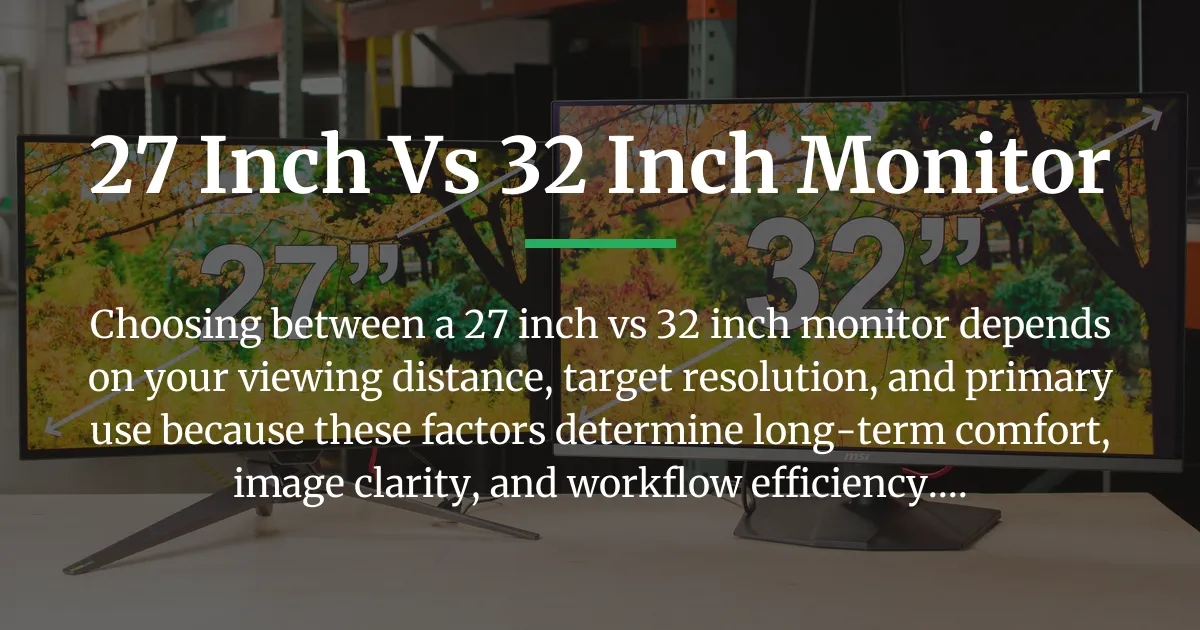
Let us begin with the simple, measurable facts. A 32-inch monitor is not just a slightly larger version of a 27-inch model. The difference in actual screen area is substantial and non-linear. This means the feeling of size increases much faster than the diagonal measurement suggests.
To understand why, you must look beyond the diagonal. The screen area is calculated using the width and height of the visible panel. A 27-inch monitor typically has a screen width of about 23.5 inches and a height of about 13.2 inches. This gives you a total viewing area of approximately 310 square inches.
A 32-inch monitor, however, has a width around 27.9 inches and a height of about 15.7 inches. This results in a screen area of roughly 438 square inches. The 32-inch monitor offers about forty percent more screen real estate than the 27-inch model. Imagine adding an entire large tablet screen to your existing display. That is the scale of the difference.
The footprint on your desk is equally important. A 32-inch monitor will be wider, taller, and often deeper than a 27-inch model. You must account for the stand’s base, which can require significant desk depth. This physical bulk is the first practical constraint. Your desk must accommodate not just the screen, but also a comfortable viewing distance, which we will explore in depth later.
| Specification | 27-Inch Monitor | 32-Inch Monitor |
|---|---|---|
| Typical Screen Width | ~23.5 inches (59.7 cm) | ~27.9 inches (70.9 cm) |
| Typical Screen Height | ~13.2 inches (33.5 cm) | ~15.7 inches (39.9 cm) |
| Screen Area | ~310 sq inches (2000 sq cm) | ~438 sq inches (2825 sq cm) |
| Area Difference | 32-inch offers ~40% more area | |
This physical reality sets the stage. A larger screen area can be a powerful tool for productivity or immersion. But it also demands more from your environment and, critically, from the technology that drives the image. You cannot simply enjoy that space without filling it properly with detail.
Why the Size Increase Feels Exponential
The human eye perceives area, not just width or height. A forty percent increase in area feels much more than a twenty percent increase in width. Your peripheral vision engages more with a 32-inch screen. This can make a 27-inch monitor feel compact in comparison, even though it is already a substantial display. This perceptual jump is why the next factors are not just important but essential for a good experience.
The Resolution Imperative: Matching Pixels to Size
Screen size alone is an empty promise. The quality of the experience is dictated by pixel density, which is the bridge between physical size and perceived sharpness. Pixel density is measured in Pixels Per Inch, or PPI. This number tells you how many tiny light points are packed into one linear inch of your screen.
A higher PPI means a sharper, more detailed image where individual pixels are harder to see. A lower PPI means you might notice the blocky structure of the image, especially with text or fine lines. The relationship between size and resolution is absolute. Choosing a monitor size implicitly chooses a minimum resolution tier for acceptable clarity.
Consider a common resolution like 1920 x 1080, known as Full HD or 1080p. On a 27-inch monitor, this resolution results in a PPI of about 82. On a 32-inch monitor, the same 1080p resolution drops the PPI to around 70. At a normal desk viewing distance, a PPI below 90 can lead to visible pixelation, where text appears soft and images lack crisp definition.
This is why resolution is the non-negotiable driver of your decision. For each screen size, there is a resolution sweet spot that balances sharpness with the performance demands on your computer. The core question flips from “27 or 32 inches?” to “What resolution must I use for a 27-inch or 32-inch monitor to look clear?”
The Sweet Spot Matrix for Clarity
For a 27-inch monitor, the widely accepted sweet spot resolution is 2560 x 1440, known as Quad HD or 1440p. This delivers a PPI of approximately 109. This density provides excellent clarity for text and images at a typical viewing distance. It is a significant upgrade from 1080p without requiring the extreme graphical power of 4K.
For a 32-inch monitor, the target for equivalent clarity shifts upward. To achieve a similar perceived sharpness as a 27-inch 1440p screen, you should aim for 3840 x 2160 resolution, known as 4K or Ultra HD. This gives a PPI of about 138. At this density, pixels become very difficult to distinguish, creating a smooth, detailed image that fills the large screen properly.
Choosing a 32-inch monitor with a 1440p resolution is a common compromise. It yields a PPI of about 93. This can be acceptable for some users, but it is a step down in sharpness. You are trading pixel density for more screen area at a lower cost and with lower demand on your graphics card. The image may not look blurry, but it will lack the razor-sharp edge of a higher PPI display.
The Risk of Low Pixel Density
Pairing a large screen with a low resolution is the most frequent mistake. A 32-inch 1080p monitor might seem like a budget-friendly way to get a big screen. In practice, it often results in a fuzzy, unsatisfying image where you can see the pixel grid. This defeats the purpose of a larger display, as the lack of detail becomes distracting. Always match the physical size with an appropriate resolution to ensure the screen area is filled with quality, not just magnified pixels.
Choosing Your Side: A Scenario-Based Decision Framework
With the physical and technical basics established, the decision becomes personal. It is about mapping your specific habits and goals to the strengths of each size. Below are detailed profiles for common users. Each profile combines the ideal size, resolution, and viewing distance to create a optimized setup.
The Competitive Esports Player
Your priority is performance and reaction time. You need to see the entire game arena instantly without moving your head. High refresh rates like 144Hz or 360Hz are crucial, and motion clarity trumps all.
For this profile, a 27-inch monitor is almost always the superior choice. The smaller screen size allows your eyes to cover the entire display from a central focus point. Pair it with a 1440p or 1080p resolution at a high refresh rate. The viewing distance should be relatively close, around 60 to 80 centimeters. This setup minimizes eye travel, keeps all game elements within your central vision, and lets you react faster. A 32-inch screen can force more head movement to see UI elements in the corners, which can slow you down in milliseconds that matter.
The Immersive Single-Player Gamer and Media Consumer
You want to be swallowed by the game world or movie. Visual impact, detail, and atmosphere are your main concerns. You enjoy expansive landscapes, rich textures, and cinematic storytelling.
Here, a 32-inch monitor shines. When paired with a 4K resolution, it creates a vast, detailed canvas that fills more of your natural field of view. The key is to calibrate your viewing distance. You should sit about 100 centimeters away. At this distance, the screen occupies an optimal viewing angle, pulling you into the experience without requiring excessive neck strain. The forty percent more screen area makes explosions feel bigger and worlds feel more real. This is where the physical size difference translates directly into immersion.
The Productivity Power User: Coders, Researchers, and Analysts
You live with multiple windows open: code editors, browsers, spreadsheets, and communication tools. Your efficiency depends on screen real estate and the ability to organize information without constant switching.
This choice has a fascinating twist. You must decide between a single large canvas or multiple coordinated displays. A single 32-inch 4K monitor acts like four 1080p screens tiled together. You can snap four full-sized windows side-by-side with perfect clarity. It offers a seamless workspace without bezels in the middle.
Alternatively, two 27-inch 1440p monitors provide a different workflow. You can dedicate one screen to a primary task and the other to reference materials. The total cost and graphical demand may be similar to a single 32-inch 4K setup. The decision hinges on whether you prefer a unified field or a physically separated multitasking zone. For many, the single 32-inch display reduces neck strain from turning between monitors.
The Creative Professional: Photo and Video Editors
Your work demands color accuracy, fine detail, and precise pixel-level manipulation. You need to see true colors and sharp edges to make accurate edits.
Pixel density is king. You must have enough pixels to see your work clearly without zooming in unnecessarily. A 27-inch 4K monitor offers an exceptional PPI of around 163, making it a detail powerhouse. Every pixel is crisp, which is ideal for retouching photos or editing video timelines.
A 32-inch 4K monitor, with its slightly lower PPI, offers more physical space for tool palettes and timelines without crowding the image. You can have your editing software fully open with panels on the side. The choice depends on your balance between ultimate sharpness and interface breathing room. Many creatives prefer the higher density of the 27-inch 4K for primary detail work, using a secondary monitor for tools.
Critical Consideration: Your Field of View and Posture
This is the most overlooked part of the decision, and it is what separates a good setup from a great one. Your monitor is not just a screen; it is an object in your physical space that interacts with your body. The concept of optimal viewing angle is rooted in ergonomic science.
The human eye has a comfort zone for viewing. Experts suggest that for detailed work and comfortable viewing, the screen should occupy about 30 to 40 degrees of your horizontal field of vision. This range allows you to see the entire screen by moving your eyes, not your head. It reduces neck strain and eye fatigue over long sessions.
This angle directly dictates your ideal viewing distance for each monitor size. For a 27-inch monitor, to achieve a 30-degree viewing angle, you should sit approximately 80 centimeters away. For a 32-inch monitor, to achieve the same comfortable angle, you need to sit about 100 centimeters away.
If you sit too close to a 32-inch monitor, say at a 60-centimeter desk distance, it will fill too much of your vision. You will need to physically turn your head to see elements at the edges. This constant movement can lead to stiffness and fatigue. Conversely, sitting too far from a 27-inch monitor wastes its pixel density. The image may look smaller, and you lose the benefit of its sharpness.
The Immersion vs. Efficiency Balance
This ergonomic rule also explains the immersion factor for gamers. A 32-inch monitor at 100 centimeters can fill a wider portion of your peripheral vision, making games feel more enveloping. However, for tasks requiring efficiency and minimal eye travel, like coding or competitive gaming, the 27-inch at 80 centimeters keeps everything within a quick glance. Your desk depth and chair setup are not afterthoughts. They are prerequisites for choosing your monitor size. Measure your space before you decide.
Frequently Asked Questions About Monitor Sizes
These questions address specific, practical concerns that arise from the main comparison. The answers are concise and build upon the principles already explained in the guide.
Is a 32-inch monitor too big for fast-paced shooters like Apex Legends?
For pure, hyper-competitive play where split-second reactions and scanning the entire screen are critical, most professional players opt for 24 to 27-inch monitors. The smaller size reduces physical eye travel time. A 32-inch monitor can be excellent for immersive play in single-player or casual multiplayer modes, but for the highest level of competition, the efficiency of a 27-inch screen is preferred. Refer to the Competitive Esports Player profile for a detailed breakdown.
Can I productively pair a 27-inch and a 32-inch monitor together?
It is technically possible, but it is often not ideal from an aesthetic or ergonomic standpoint. The monitors will have different physical sizes and likely different pixel densities if their resolutions differ. This creates a jarring visual mismatch across the bezel. Your eyes must constantly adjust to the size and sharpness difference. For a unified and comfortable multi-monitor experience, using identical models is strongly recommended. The Productivity Power User section discusses the logic behind multi-monitor setups.
For programming, is text sharper on a 27-inch 1440p or a 32-inch 4K monitor?
At their recommended viewing distances, both can offer superb text clarity. The 27-inch 1440p monitor has a higher PPI (about 109 vs 138 on the 32-inch 4K). This can make the edges of fine text characters appear slightly crisper on the 27-inch model. However, the 32-inch 4K monitor provides vastly more screen real estate. You can spread out your code, terminal, and browser windows without needing to use scaling, which can sometimes blur interfaces. Choose based on your need for ultimate pixel-level sharpness versus the desire for massive workspace. This directly applies the principles from The Resolution Imperative section.
Will a 32-inch 1440p monitor look noticeably pixelated?
At a typical desk distance of 80 centimeters, some users with sharp vision may perceive that text is not as razor-sharp as on a higher PPI display. It is not “blurry” in the traditional sense, but it lacks the crispness of a 32-inch 4K monitor or a 27-inch 1440p monitor. It is a conscious trade-off: you gain screen size and reduce the demand on your graphics card, but you accept a slight softness in fine details. This is a core example of the pixel density concept explained in detail earlier.
The journey through the 27 inch vs 32 inch monitor decision reveals that the best choice is engineered, not guessed. It is a function of your space, your hardware, and your habits. By anchoring your decision to viewing distance, required resolution, and a clear use case, you transform subjective preference into an objective solution. This ensures your new monitor becomes a tool for comfort and capability, not a source of daily compromise.